KinectMask, dynamic masking

ONLY NEEDED BY MILLUMIN V1
Millumin V2 supports natively all models of Kinect V1 and V2 (the one for XBox One).
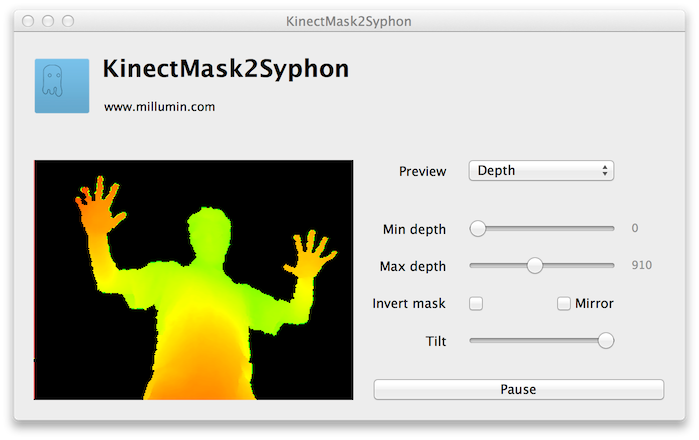
With KinectMask, you can create a dynamic and organic mask, based on the depth.
Please download it, and send me feedback !
To use it :
- Plug your Kinect and launch KinectMask2Syphon
- In Millumin, create a layer on top of the other layers your want to mask
- From the library, use the Syphon server called "KinectMask2Syphon"
Comments
It seems to be a Kinect connection problem. Be sure you plugged the Kinect directly to your USB port (no USB hub).
For info, I'm using the Freenect library to connect to the Kinect.
I sent you an email with some testing applications, so we could dig your issue.
Best. Philippe
The test was made with the 360-version but it should work with the PC-version. Which do you have ?
Best. Philippe
Yes, KinectMask will detect anything : you just set the near/far distance, and it creates a mask where there is something between these distances.
Am I clear ?
Best. Philippe
Sorry but this is a problem on a few computers. It's because of the Kinect libraries.
A quick fix is to duplicate the layer, and move it by 1 pixels : so the transparent lines are covered.
Another solution is to use Synapse instead (it uses another Kinect libraries).
Best. Philippe
No, there is no other app. But you can use Synapse.
If you wanna use 2 Kinect, you'll have to build your own app : Openframeworks and ofxKinect is a good start.
Best. Philippe
I'm having the same problem that @deckard97 posted about the lines in the background.
Thanks in advance.
The Kinect is not very accurate, and you cannot have a "good result".
There is no difference between KinectMask and Synapse (except the drivers in Synapse, that support the very recent Kinect, but don't improve the quality at all).
You should use an infrared camera with more "lines" to get better results.
Best. Philippe
I've been working on a new application to control more things with Kinect (such s gestures), and support the new Kinect for 360. But unfortenatly, I do'nt have a release date to give you.
If you need a tutorial to do the same thing as KinectMask with Synapse, please write me an email : contact@millumin.com
Best. Philippe
There is no feather option, but you can easily add a blur effect, directly in Millumin.
Best. Philippe
Sorry but there is no solution. However you can use Synapse instead (it uses more recent Kinect libraries).
Best. Philippe
As far as I know, there isn't much alternative : Xtion Pro or PrimeSense Sensor.
An infrared camera could be a good choice too.
Best. Philippe
Thank you
J. Carlos
If no image is shown in "KinectMask2Syphon" application, it's because your Kinect model is not supported (firmware changed over the years, please refer to the previous message of this topic).
Another solution is to use Synapse.
Best. Philippe
Did you try to use another USB port : sometimes the Kinect is reluctant at connecting to some low powered USB ports.
SSD or not, it won't make a difference.
Best. Philippe