Stuck in Missing Audio Interface Pop-up (solved)

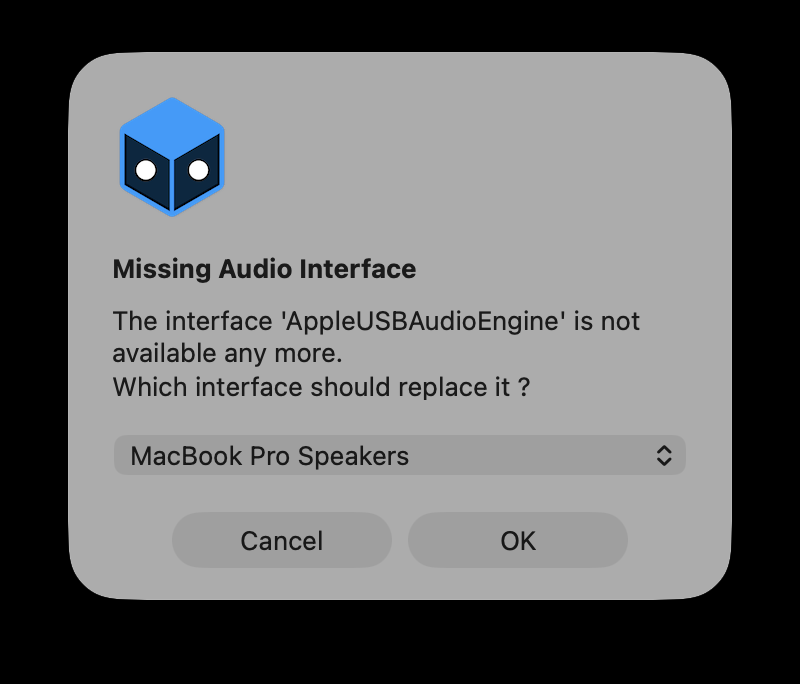
Hi, I am trying to open a project that has a disconnected audio interface.
This pop-up appears, asking me to replace it, however, no matter what I click, Ok, Cancel, or changing to any other interface, nothing happens, and Millumin is just stuck there. I have to force quit it to get it to close.
Now I have no way to open this project has it always pop this message up, and pressing any button has no response.
Comments
Hello @XenoJin,
I tried the same on macOS 26 Tahoe, and it worked fine.
Could you send us a TeamViewer session (or equivalent) via email ? So we could check this out.
Best. Philippe
If you open a project with a lot of Milumin memory without that device, in my case, it will recover if you wait a long time.
Be careful when using audio routing.
Hello @Hyungjae,
We are not aware of such an issue.
Could you tell us more about your issue (ideally send us an email with your project) ? We will open a ticket, thank you.
Best. Philippe
Hello @Millumin , what email do I send it to?
Hello @XenoJin,
Well, our support address : contact / millumin
Best. Philippe
Hello @XenoJin,
Thank you for your project.
Indeed, the problem was happening when : having a missing audio device for audio-routing, using the browser-media and running macOS 26. This will be fixed in next update (5.14.k).
We sent you an intermediate version in the meantime.
Best. Philippe
Hey there, turns out the intermediate version also has the same issues...
Hello @XenoJin,
Yes, we updated our fix.
We just released the beta 5.15.d with this fix.
Best. Philippe
I've updated to the beta build, and the issues are now fixed!
Great work! Thanks!
I noticed it happens when keep hot is selected on the browser input. In case anyone needs a short term fix without using beta.
Hello Philippe,
I’m experiencing an intermittent “Missing Audio Interface” message at startup and wondered whether it could be related to the bug discussed in this thread.
My setup is a museum installation running daily:
The project opens automatically at startup and plays continuously in a loop. All projectors and audio equipment are switched on before the Mac starts.
Occasionally, Millumin displays “Missing Audio Interface” even though everything is powered on and the connections have not changed. Clicking Cancel and restarting the Mac usually restores normal playback and 5.1 audio.
Unlike the original report here, Cancel does respond in my case. As far as I know, my project contains no browser media, only video and audio files.
I saw that the revised fix was confirmed in beta 5.15.d. Is that fix also included in the stable 5.14.l release? Could it apply to my situation, or does this suggest a different issue involving the HDMI audio device’s availability or identifier at startup?
Since this installation needs to run unattended for several months, which stable version would you recommend? Is there a log or diagnostic report I could provide to help identify the cause?
Thank you for your help,
Laura
Hello @Laura,
The fixed discussed in this thread has been included in official version 5.14.k : it was an interface problem on macOS 26. However, in your case, it seems to be a detection problem with your audio interface, thus not directly related to Millumin.
When this happens, do you see the audio interface (used in Millumin's audio-routing) in macOS System Settings / Audio ?
Best. Philippe