Canvas Slicing Question

Hi all,
I’m trying to solve an output-mapping issue in Millumin and I’m not sure if I’m missing a step or if this workflow just isn’t ideal for Millumin.
My canvas is 5952×1344.
This represents three LED walls:
• Main USC: 3264×1344
• IMAG Left: 1344×1344
• IMAG Right: 1344×1344
One LED processor handles the USC wall, and a second processor handles both IMAG walls (combined as 2688×1344).
From Millumin, I’m outputting two custom formats to an E2:
• 3264×1344
• 2688×1344
The problem:
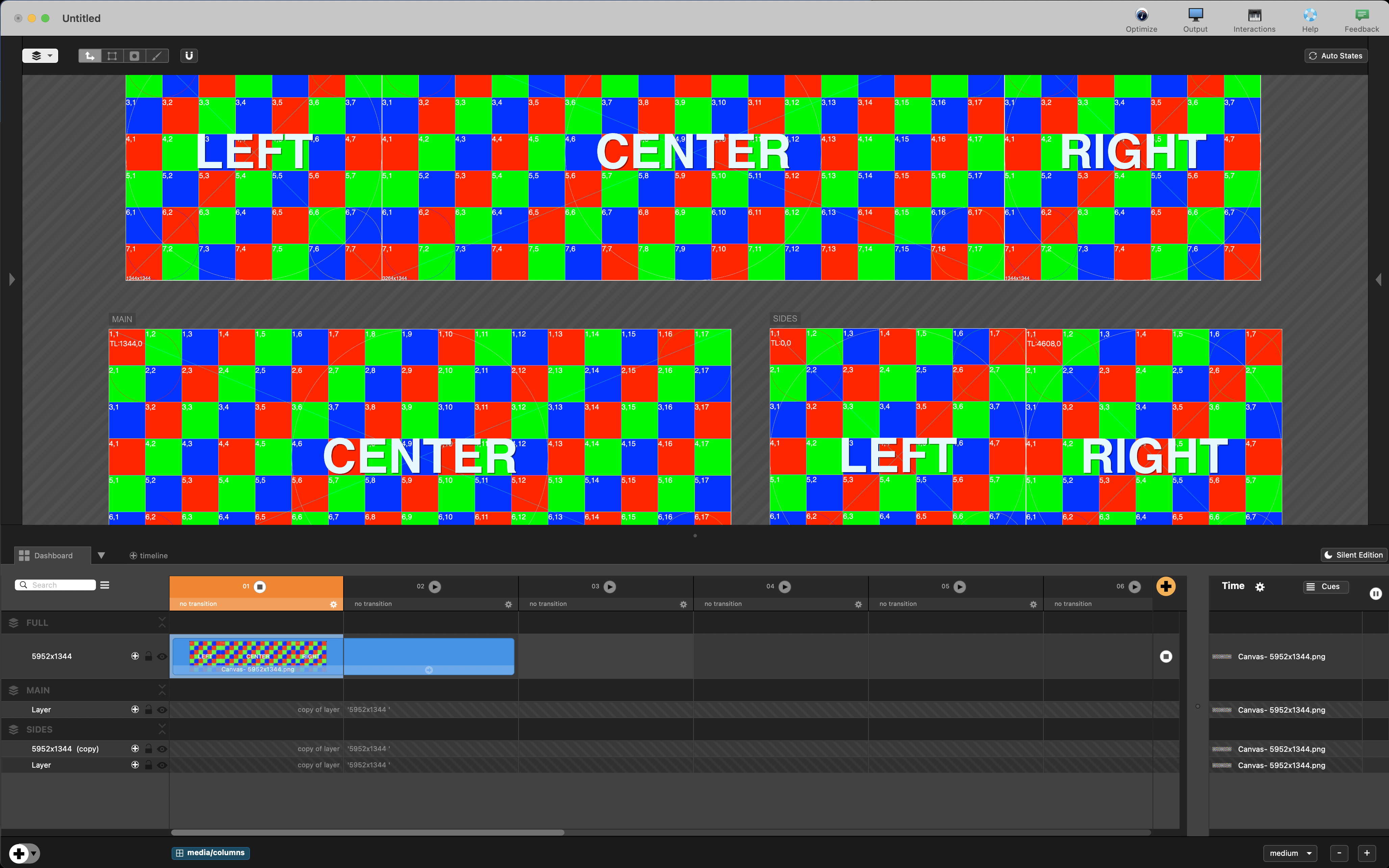
For the IMAG feed, I need Millumin to take the leftmost 1344×1344 section of the full canvas and the rightmost 1344×1344, and merge them side-by-side to create the final 2688×1344 output.
I can do this in Resolume by creating a screen with two slices referencing the relevant portions of the canvas.
In Millumin, I’ve tried:
• Video Router – works perfectly for the Main USC, but not for the IMAG section.
• Layer copies + slices – works per layer, but becomes messy very quickly because I’d need to copy/slice every layer I add to the main canvas.
Attached is a screenshot showing the overall canvas at the top, the two custom outputs below, and how the IMAG feed should be composed.
Has anyone run into this workflow before, or is there a clean way to build a merged output like this inside Millumin?
Any suggestions appreciated.
Comments
Hello @lukem,
I think the right way to go is having 1 or 2 video-routings, but tell us exactly more about the content.
What is your content : a single 5952×1344 image accross 3 continuous LED walls ? A single image accross 3 LED walls with space in between ? Different content on each LED wall ? Both ?
Best. Philippe
This is very quick and simple to achieve with video routing; no need to use copy layers or anything else.
Have a practice using the video routing features, specifically the 'Slice Editor' window.